

TL;DR
Localized Market Pricing lets you display product prices that already include cross border costs like shipping, duty, tax, and fees so customers see a familiar, all-in price at checkout. This boosts international conversions and protects your margins.
Overview
Localized Market Pricing allows you to manage your product catalog by market and automatically calculate inclusive prices for each country.
By including costs like duties, taxes, and shipping upfront, shoppers can check out without surprise fees, leading to higher conversion rates and smoother delivery experiences.
This feature is available both in the FlavorCloud App for Shopify merchants.
Limitations
- Province or state-level granularity (like GST/PST breakdowns in Canada) isn’t supported yet.
- Declared value for customs remains unchanged. It’s separate from displayed pricing.
- Multiple country markets.
Set up localized market pricing in the FlavorCloud App
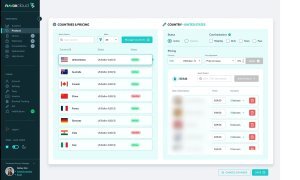
- Make sure you don’t already have an existing market in Shopify for the market you are about to build. If there is an existing market with the country you intend to create a localized market for, delete it in Shopify before moving into the FlavorCloud App.
- In the FlavorCloud App, Go to Products → Markets.
You’ll see a list of countries on the left and detailed settings for each selected country on the right. - Add or manage countries.
- Click Manage Countries to add new markets.
- Select a country to edit.
- Activate your market.
- Toggle the status to Active to enable pricing for that market.
- Select cost inclusions. Choose which landed cost components to include in your product price:
- Shipping
- Duty
- Taxes
- Fees
- Adjust pricing. You can apply a global or percentage-based price adjustment to account for margins or promotions.
- Sync with your store. For Shopify merchants, Localized Market Pricing can automatically sync your adjusted prices to your storefront.
- Save your changes. Once saved, these all-in prices will display to international shoppers in their selected currency.
Best practices
- Start with a few key markets (e.g., UK, Australia, or Canada) before expanding globally. But once working on your store, to achieve a domestic-like or “prime-like” shopping experience FlavorCloud recommends including duties, taxes and fees on all markets. Buyers expect shipping costs at checkout, but the surprise fees that deter checkout are duties, taxes and fees which can be included in an all-in, fully-landed cost as they’re shopping on your website.
- Review estimated landed costs regularly to ensure margin accuracy.
- Use localized pricing to meet regional tax display expectations (like VAT-inclusive pricing in the EU).
FAQs
Can I exclude certain cost components from product prices?
Yes. You can select which elements (shipping, duty, tax, or fees) are included per market.
Does this affect customs clearance?
No. Customs declarations still rely on declared value, not the localized display price.
Can I use this with DDP?
Yes. It works seamlessly with FlavorCloud’s Delivered Duties Paid (DDP) model—buyers will see the full landed cost upfront.
What’s the benefit for my business?
You’ll reduce cart abandonment and post-purchase confusion, while maintaining visibility into true landed costs and protecting your profit margins.
For information on tracking your results read more about tracking your localized market pricing performance in Shopify.