

Overview
Understanding how FlavorCloud displays shipment progress helps you manage expectations and support your customers. We standardize carrier tracking into key milestones while also showing detailed carrier events.
Delivery timeline
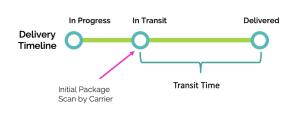
The delivery timeline covers the entire journey of an order — from the time the merchant acknowledges it to when it arrives at the customer’s door.
It includes:
- Merchant preparation and fulfillment
- Transit time in the carrier’s custody
- Customs processing (if applicable)
FlavorCloud displays delivery timeline milestones:
- In Progress
- In Transit
- Delivered
- Arrived at Export Gateway
- Arrived at Import Gateway
- Arrived at Customs
- Attempted Delivery
- Carrier Delay
- Carrier Hold
- Cleared Customs
- Customs Delay
- Customs Hold
- Customs Processing
- Damaged
- Delivered
- Disposed
- In Transit
- In Transit – Last Mile
- In Progress
- Lost
- Out For Delivery
- Undeliverable
- Undeliverable – Returned to Sender
- Undeliverable – Address Issue
- Undeliverable – Recipient Refused
Transit time
The transit time refers only to the period when the carrier is transporting the package.
Transit times are estimated at checkout but can be influenced by external factors like:
- Weather events
- Strikes or unrest
- Local carrier capacity issues
Merchants can help reduce delays by ensuring:
- Accurate product descriptions
- Correct customs valuation
- Proper HS code classification
Carrier tracking events
Carriers provide additional detail beyond FlavorCloud milestones. The level of visibility depends on service type:
- Express carriers: Most detailed, with frequent checkpoint scans (pickup, customs, delivery).
- Standard carriers: Moderate detail at key milestones.
- Economy carriers: Fewer events, especially after customs clearance, where final-mile carriers may provide only limited updates.
FlavorCloud consolidates all events into your branded tracking page. In economy services, final-mile carrier links may provide extra detail.
How to read carrier events
- “Label Created” or similar: The carrier has been notified electronically, but the package has not been picked up.
- “Picked Up”: Confirms the package is now in the carrier’s custody.
- “Departed Processing Center”: Shipment is en route within the carrier network.
- “Delivered”: Shipment confirmed at the customer’s address.
FAQs
Why does my shipment look stuck “In Progress”?
This means the carrier hasn’t yet confirmed pickup. Check with your warehouse or carrier if the package has actually been handed off.
Why are there fewer events for economy services?
Economy carriers often consolidate scans. Final-mile updates may only appear after customs clearance.