
In FlavorCloud, you have full control over your orders. If an order needs to be canceled, you have two options:
- Fully cancel the order
- Cancel the fulfillment of the order
Fully Canceling an Order
If a customer no longer wants a product or needs to modify their order, canceling and allowing them to reorder may be the best option. Other reasons for cancellation might include inventory issues or other merchant-side concerns.
The most efficient way to cancel an order entirely is through your online store. Since FlavorCloud is directly integrated with your store, any changes you make—such as cancellations—will automatically update in FlavorCloud. In FlavorCloud, you can find cancelled orders in the Archive section.
Once an order is canceled in your store, FlavorCloud will receive the cancellation and update the order accordingly. If you attempt to fulfill an order after it has been canceled, our system will prevent fulfillment, ensuring that only valid orders are processed.
By canceling the order in your online store, you ensure that the order is removed from both your store and FlavorCloud.
Canceling Fulfillment Only
In some situations, you may want to keep the order but cancel its fulfillment. This could be necessary if the order will be fulfilled by a different method, such as local or manual delivery.
You can only cancel fulfillment for orders that are not already in transit. Once an order is in transit, only the carrier can change its status.
Canceling the Fulfillment of a Single Order
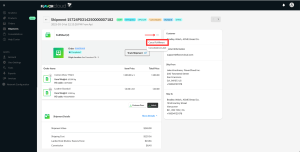
- Navigate to the Shipments screen.
- Click on the shipment you want to cancel.
- In the Shipment details page that opens, click the three dots
- Select Cancel Fulfillment.
Canceling Fulfillment for Multiple Orders
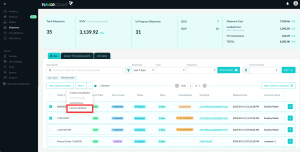
- Select the orders you want to cancel by checking each order.
- Click on the Actions menu.
- Select Cancel Fulfillment.