

Overview
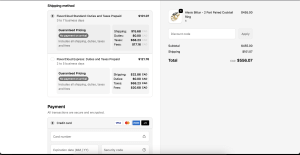
In order to show full breakdowns of landed costs, add the checkout extension: Cost Breakout in your Shopify admin. Cost Breakout is a branded Shopify checkout extension that allows your users full understanding of shipping and landed cost. Without this extension your end customers will not understand the full breakdown of Shipping, Duty, Taxes, and Fees they are paying at checkout.
Limitations
The checkout extension is only available on the Shopify Plus plan due to limitations set by the Shopify team.
How to add the checkout extension Cost Breakout to your Shopify checkout
Follow these steps to enable the checkout extension Discounts in Shopify: Log in to your Shopify Admin.
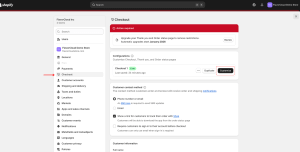
Enable the extension in Shopify Checkout Settings by going to Settings > Checkout and in the Configuration section select Customize.
You will be brought to the checkout editor, in this section select Apps and search for the FlavorCloud Cost Breakout checkout extensions. Toggle it on.
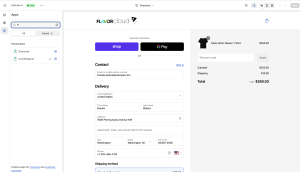
Save your settings.
Test a transaction to ensure that the landed cost is correctly calculated based on the discounted total.
Managing accent colors:
FlavorCloud will use a shade of the accent color from your Shopify settings as the checkout extension background color. To change this color, select “Settings” on the sidebar and scroll until you see “Accent”
Key Benefits:
- Higher Transparency: Show the full breakout of shipping, duty, taxes, and fees to your end customers.
- Branded Experience: FlavorCloud will use your checkout accent colors when creating the extension
- Higher Conversions: More transparent pricing can lead to increased international sales.
FAQs
What happens if I don’t enable the checkout extension Cost Breakout?
If you do not enable the checkout extension Cost Breakout, FlavorCloud will continue to show the breakout in the third line of checkout.
Will this affect my existing FlavorCloud integration?
No, the checkout extension Cost Breakout simply enhances the checkout experience for end customers. Your FlavorCloud integration will continue to function as usual.
How can I get support if I have issues?
For assistance, reach out to FlavorCloud Support via email or through your FlavorCloud app